Ben Calderon gives a friendly walkthrough of the Address Resolution Protocol: why local networks need both IP and MAC addresses, how arp-scan lists every device with its manufacturer, what an ARP exchange looks like in Wireshark before a ping, and how to inspect the Linux neighbour table.
Hello there!
So, I can never remember what IP addresses I have given to devices on my network, or which IP my router has assigned to each one. Recently I’ve been learning about ARP (or Address Resolution Protocol) and tools like arp-scan, and I wanted to share how cool it is!
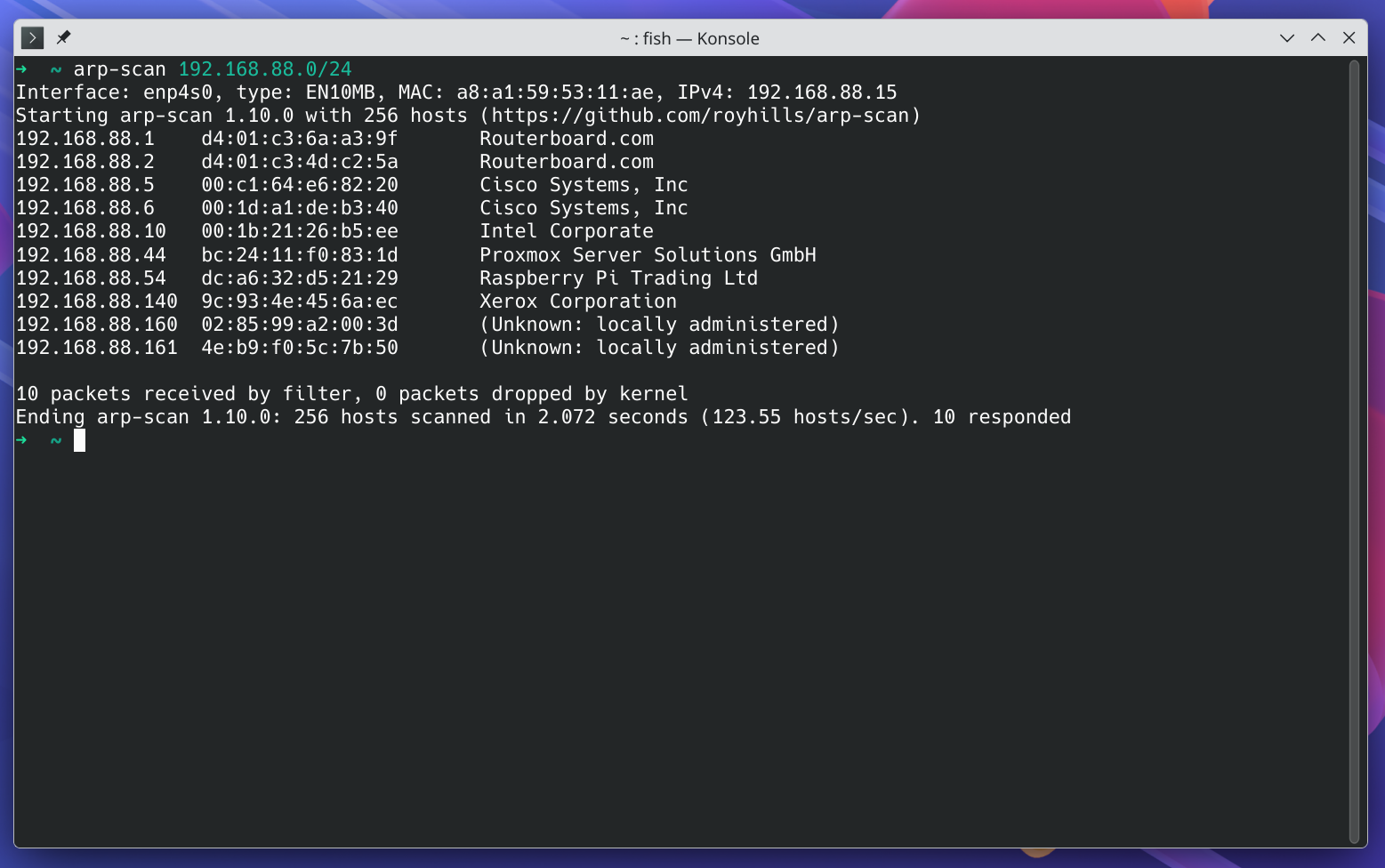
That’s arp-scan listing every device on my network with its IP, its MAC address, and, most helpful of all, the manufacturer. Here’s how the thing works.
So here’s the story. In your local network, when you want to send a message to a device, you need both its IP address and its MAC address. Why would you need two addresses, you ask? That’s a great question, and answering it fully would make this post longer than I want it to be. The briefest answer is that your network switch doesn’t speak IP. All it knows is which devices (identified by their MAC address) are connected to which port. When it receives a packet (technically a frame, but I digress) addressed to some MAC, it forwards it out the physical port that device is plugged into. That's it, that's the bulk of switches' work!
Anyway, I bet you’ve never typed ping AA:BB:CC:DD:EE:FF either. Ain’t nobody got time for that! ping only takes an IP, so how does your computer know the MAC address for 192.168.88.140 when you ping it? Well, it asks, literally!
Take a look at this conversation in Wireshark:
Even though I only ran a ping command, some communication happens first, and that’s ARP.
It all starts with my computer asking everybody on the network, "Hey, who has 192.168.88.140?" That message is broadcast, meaning it’s sent to every device on the network. My network is well behaved, so only the right recipient answered: my Xerox printer, saying, “I have 192.168.88.140, and my MAC address is .....” (My workstation has an AsRock motherboard, if you’re wondering where the source MAC came from.) With that, my computer has everything it needs to send the ping with both the IP and the MAC in the packet.
As your computer talks to other devices on the local network, it builds a list of all the neighbors it knows.
On Linux you can see that list with ip neighbour show. If you want to watch your computer ask for the MAC of a neighbor it doesn’t know, you can make it forget everything with sudo ip neighbour flush all.
This mechanism has some interesting consequences. What if I have an impostor who claims to be 192.168.88.1? Good question. Look up ARP spoofing. 😉
Also, every device receives that broadcast. What if a misbehaving device sends broadcast messages nonstop? Look up broadcast storms, and be responsible with what you learn! 😎
That’s ARP in a nutshell. Next time your network feels like a mystery, just ask it.