Cmd+Ctrl explains per-session phone notifications for AI coding agents: pick the one or two sessions that may ping your phone, and keep the rest quiet when you are running many agent sessions.
With Cmd+Ctrl, push notifications work on a session-by-session basis. Tap the bell on a session – Get notifications – and that session pushes to your phone when the agent finishes. Every other session stays quiet.
On my radar, still important but without the ping
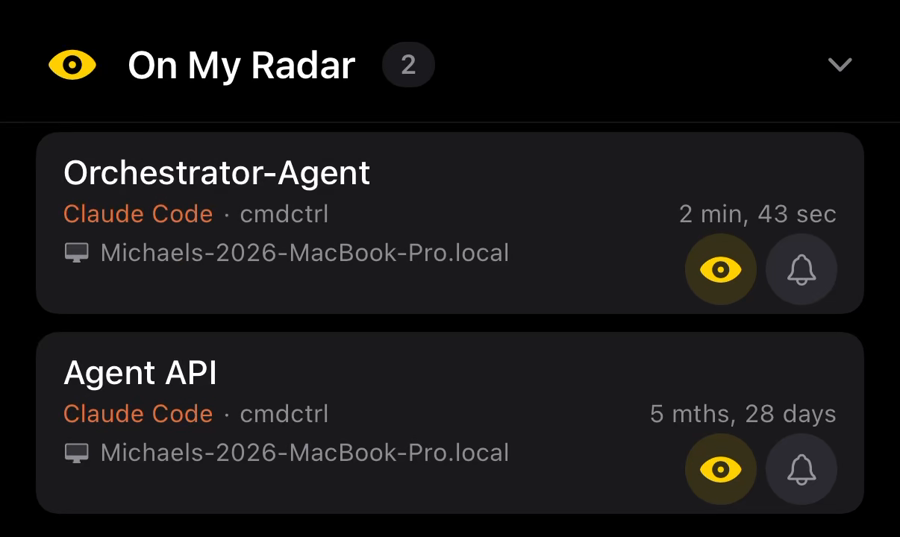
There's a middle tier between "notify me" and "ignore it" because some sessions I still want on my radar even if I don't want push notifications. Hence, Cmd+Ctrl On my radar.
An "On my radar" session sits at the top of your list where you can glance at it, but it never notifies. It's for the session I want to keep an eye on without being interrupted by it – a long-running job on the back burner that I don't want to forget.
Notify me, keep it on my radar, or leave it alone until I go looking.
So a typical day looks like this: one or two sessions with notifications on, a handful on my radar, and everything else out of the way until I go looking.
None of the main coding agents' native mobile apps do this. It's all or nothing when it comes to alerts.
Claude Code Remote Control has two account-wide push toggles – one for when Claude decides to notify you, one for when it needs input. The docs say there's no finer control. The Claude desktop app can mute notifications for a whole project.
OpenAI Codex has global notification settings in the ChatGPT apps. Per-thread muting is an open feature request.
GitHub Copilot in GitHub Mobile shows live progress notifications for agent sessions, switched off globally in Settings. Its push categories have no agent category, and its docs show no per-session control.
It's very useful to be able to say "alert on this session, not those".
This may seem like a small feature on paper. In practice it's what makes running many agents from a phone workable – your attention goes to the sessions you've decided matter, and nothing else nags you.