---
title: "Rendering untrusted HTML email, safely"
slug: rendering-untrusted-html-email-safely
url: https://listedarticles.com/articles/rendering-untrusted-html-email-safely
canonical_url: https://making.close.com/posts/rendering-untrusted-html-email-safely/
content_type: blog_post
language: en
published_at: 2021-09-29T00:00:00.000Z
updated_at: 2026-10-20T08:10:05.656Z
author: "Phil Freo"
authored_by: human
publisher: "Close"
publisher_url: https://listedstartups.com/companies/close
topics: ["Security", "Web Development", "Email", "Frontend"]
license: all-rights-reserved
word_count: 1910
reading_minutes: 8
citation: "Phil Freo, Close. \"Rendering untrusted HTML email, safely.\" 29 Sept 2021. https://making.close.com/posts/rendering-untrusted-html-email-safely/ (all-rights-reserved)"
# The full text follows. The web page shows an extract and sends readers
# to the source above; quote the citation and link the canonical URL.
---

# Rendering untrusted HTML email, safely

> Close's Phil Freo explains how the sales CRM renders synced, untrusted HTML email safely inside its single-page app entirely on the client side, comparing server-side sanitizing and other approaches to the sandboxed iframe technique it uses, along with handling iframe height and a secure WYSIWYG editor for composing.

# Rendering untrusted HTML email, safely

Phil Freo | The Making of Close | September 29, 2021

One of the earliest core features we built in Close was our
[email sync feature](https://close.com/emailing/), which allows Close to
automatically pull in email communication between your sales team and your sales
contacts and display them for your team to see. We present a unified timeline of
all communication (emails, calls, SMS, etc.) with a sales lead in one place for
your team.

This feature required that we build a way to display email in our web app –
*safely*, without security concerns that typically come with naively rendering
untrusted HTML
([Stored XSS Attacks](https://owasp.org/www-community/attacks/xss/#Stored_and_Reflected_XSS_Attacks)).

We launched our ability to display synced HTML email in 2014, however the
technical side of it is still very relevant and (I think) interesting since our
approach is not one that I've seen widely used.

In the end, we found a way to, exclusively on the client-side (in web browsers),
render untrusted HTML email safely inside our single-page application (written
originally with Backbone.js, now mostly React). Here we'll discuss a few
approaches we had to consider and how we solved this problem.

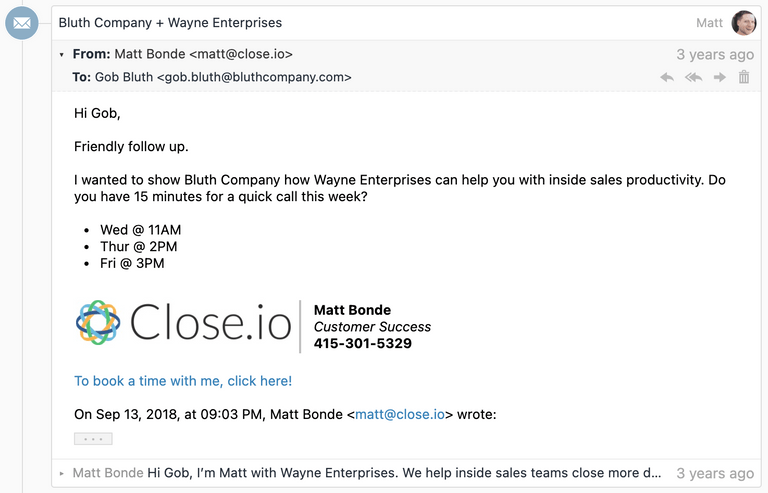
For example, we can display an IMAP-synced email thread like this:

[![email](https://making.close.com/static/59bc283663f231da9d5d10687803846a/fe486/email.png)](https://making.close.com/static/59bc283663f231da9d5d10687803846a/18650/email.png)
# HTML vs Plaintext?

While many emails do come with a plaintext variant, we had to immediately
dismiss the idea of only displaying plaintext email, as convenient as that would
have been from a security perspective. Many emails don't have a reasonable
plaintext alternative, and users simply expect to be able to view HTML formatted
email as they were designed.

Some emails *only* have a plaintext variant. In those cases we can render the
plaintext content pretty simply in our web app: effectively just convert new
lines into `<br>` tags and convert URLs into links.

But most of the interesting engineering/security concerns are around rendering
untrusted HTML content (in this case, email content) safely, which is where the
remainder of this blog post will focus.

# Main goals and concerns

Our main goals were the following:

- Display HTML email, not just plaintext
- Display "full" HTML email. We care about much more than just a few simple tags
  like `<b>` and `<i>`, but rather want to support displaying sophisticated
  email styles (including custom `style` tags) that you often see in
  well-designed HTML email newsletters, calendar invitations, etc.
- We want to render emails within our web application, without any conflicts of
  our CSS leaking in or the email CSS leaking out.
- In addition to CSS styles, we also want to display images, expect links to
  work, etc.
- Most important: Do not let any JavaScript run. Otherwise we run the risk of an
  attacker taking over our user's Close account by stealing cookies, or a number
  of other Very Bad™️ things.

# Finding a solution…

## Saying No to HTML Sanitization

While there may be some rock-solid libraries out there that can take untrusted
HTML content and make it completely safe for rendering in HTML, there were a lot
of potential downsides to this idea.

First off, in 2014, we didn't immediately trust any of them. HTML sanitization
libraries often rely on parsing HTML with regex, which is a
[notoriously bad idea](https://stackoverflow.com/a/1732454/137067). We
absolutely didn't want to be trying to maintain a library like this ourselves,
or have to worry about some unhandled edge case that could lead to a major
security vulnerability.

Additionally, unlike other use cases (e.g. rendering a blog comment which may
contain just some basic markup for bolding text), we felt like we needed to
render complex (heavily styled) HTML emails properly, just like you'd see in
Gmail or other modern email clients, so we couldn't default to a tiny whitelist
of tags or supported attributes.

Finally, HTML sanitization on its own wouldn't be enough, because we want to
render the email within an existing web app, and we don't want its styles
affecting the styles of the rest of the web app. There's a well-known solution
to this – iframes – that we could have used to help here.

Once we explored iframes, however, we realized they could do everything we
needed already on their own…

## What can iframes do for us?

Most web developers know that an `<iframe>` can render a web page in a fairly
isolated fashion. Certainly they can solve the issue of our web app styles
incorrectly affecting an email's styles (or vice versa).

But we still have that pesky issue of JavaScript.

### Uncommon but helpful iframe attributes

There are a number of lesser known iframe attributes that can be very helpful.
Let's take a look at a few.

#### **`srcdoc`**

Most commonly iframes point to a `src` webpage URL – either on the same origin
or different origin. But since Close is a Single Page Application and our
frontend would already be fetching data about the email from our
[REST API](https://developer.close.com/) (and could include the email body
itself), we discovered that this attribute allowed us to inject HTML content
into an iframe (with all the typical iframe benefits) without needing that
content to be served by a separate page.

So rather than having to do something like:

`<iframe src="/email/body/?email_id=EMAIL_ID_HERE">`

... which would have required us to setup an additional endpoint, we could
simply display the HTML we already had:

`<iframe srcdoc="UNTRUSTED_HTML_HERE">`

Neither approach is particularly more or less secure than the other. Both make
you still think about "what about script execution" and consider the "same
origin" vs. "different origin" options (e.g. we might have needed a separate
domain and then have to pass some kind of token for authentication). We chose
`srcdoc` because it worked and was easiest for our setup.

For the value that we inject into the `srcdoc`, we actually wrap the HTML email
in a little HTML, with two main goals:

- Give email bodies some sane default styles, and make them fit into the
  look-and-feel of our web app by default.
- Put `target="_blank"` on all links by default (via a `<base>` tag), since we
  never want a user clicking an email link to load a new webpage in the iframe,
  and this is also a convenient way for us to apply this behavior to all links
  without having to traverse the email's HTML.
- Apply a [`Content-Security-Policy`](https://content-security-policy.com/)
  `<meta>` tag instructing the iframe document to avoid executing any JavaScript
  whatsoever. (If we used a hosted page with `src` instead of `srcdoc`, this
  would be done with an HTTP Header instead).

```
<html>
  <head>
    <meta http-equiv="Content-Security-Policy" content="script-src 'none'" />
    <base target="_blank" />
    <style>
      body {
        margin: 0;
        font:
          13px -apple-system,
          system-ui,
          'Segoe UI',
          Roboto,
          Oxygen-Sans,
          Ubuntu,
          Cantarell,
          'Helvetica Neue',
          sans-serif,
          'Apple Color Emoji',
          'Segoe UI Emoji',
          'Segoe UI Symbol',
          sans-serif;
        overflow-y: hidden;
      }
      html:not(.x),
      body:not(.x) {
        height: auto !important;
      }
      p:first-child {
        margin-top: 0;
      }
      p:last-child {
        margin-bottom: 0;
      }
      a[href] {
        color: #3781b8;
        text-decoration: none;
      }
      a[href]:hover {
        text-decoration: underline;
      }
      blockquote[type='cite'] {
        margin: 0 0 0 0.8ex;
        border-left: 1px #ccc solid;
        padding-left: 1ex;
      }
      img {
        max-width: 100%;
      }
      ul,
      ol {
        padding: 0;
        margin: 0 0 10px 25px;
      }
      ul {
        list-style-type: disc;
      }
    </style>
  </head>
  <body>
    ${bodyHtml}
  </body>
</html>
```

#### **`sandbox`**

This attribute is the heart of our security model. By adding this attribute, it
adds a whole bunch of restrictions to the iframe document, including preventing
any JavaScript from running! Learn more about what's blocked
[here](https://html.spec.whatwg.org/multipage/iframe-embed-object.html#attr-iframe-sandbox)
and [here](https://developer.mozilla.org/en-US/docs/Web/HTML/Element/iframe).
The `sandbox` attribute allows you to opt back in specific behaviors that are
blocked by default. We only allow:

- `allow-popups` – We add `target="_blank"` to all of them.
- `allow-popups-to-escape-sandbox` - So that external webpages opened via a link
  actually function properly.
- `allow-same-origin` – We need this for our web app to detect the height of
  iframe's content. This would be dangerous (and defeat the purpose of
  `sandbox`) if we also allowed scripts to run by also including
  `allow-scripts`, however it's harmless on its own.

#### **`csp`**

We add a Content Security Policy to the iframe with a value of
`script-src 'none'` as an additional mechanism to avoid any JavaScript from
running in the iframe. This is mostly duplicative with `sandbox` but provides an
extra layer of protection in
[browsers](https://caniuse.com/#feat=mdn-api_htmliframeelement_csp) that support
it.

As you can see, we have some overlap in coverage here (e.g. 3 separate features
to avoid JavaScript running). We have learned of particular browser bugs where
there were temporary limitations in any one of these indvidiual approaches. A
reminder that security in layers is often best.

## Bringing it together...

```
<iframe
  srcdoc="{{UNTRUSTED_HTML_HERE}}"
  sandbox="allow-popups allow-popups-to-escape-sandbox allow-same-origin"
  csp="script-src 'none'"
/>
```

## Handling unsupported browsers

As soon as we made the decision to rely on `<iframe sandbox>` as our primary
safety mechanism, we also had to consider users with browsers who didn't have
this safety mechanism, so that we didn't put their accounts at risk. Feature
detection to the rescue:

```
// Don't show HTML at all if they are using a browser that doesn't support <iframe sandbox>
// since our security model relies on it to prevent XSS.
// (And the basic functionality relies on <iframe srcdoc>)
const iframe = document.createElement('iframe');
const isHtmlEmailSupported = 'sandbox' in iframe && 'srcdoc' in iframe;
```

Based on this, we can make sure we *only* display the plaintext email variant
(if one exists) or else render a message like "Your browser does not support
displaying email content."

## Known limitations

One can envision additional enhancements where we *would* want to parse and
modify the email HTML before rendering it. One example would be if we wanted to
try to rewrite and proxy all image URLs
([similar to Gmail](https://gmail.googleblog.com/2013/12/images-now-showing.html))
to protect our users' privacy.

Similarly, we do have a problem where browsers will show a Mixed Content warning
(since our site is `https://`) after you display an email that includes an
`<img>` with an `http://` `src`. Those warnings are still fairly unobtrusive,
however, but ultimately we should proxy them to be served over https.

So while we may one day layer in additional HTML parsing measures (either
client-side or server-side), and could decide to switch from an
`<iframe srcdoc>` to `<iframe src>`, the other security features mentioned here
would still likely play an important part of safely rendering HTML email.

## Lots of other details to get right

There were a lot of other details to get right. Each of them could deserve their
own blog post, but here is a summary:

- We have to convert "inline" images (images that are embedded within the email
  itself, not referencing an external URL) to be displayable by the web browser.
- We have to deal with understanding quoting parts. We wrote
  [quotequail](https://github.com/closeio/quotequail) for this. (Mailgun later
  open sourced a similar library called
  [talon](https://github.com/mailgun/talon)). You can see in the screenshot at
  the top of this post a little "..." button where the quoted part of the email
  is collapsed by default, but expandable.
- We want to avoid the "extra scrollbar" issue you typically experience with
  iframes, so we carefully (this is surprisingly tricky) detect the height of
  the iframe email contents and then set the iframe to that height, giving it a
  seamless look on the page.
- We need to consider how composing email works too. We needed a WYSIWYG editor
  for HTML Email that also prevents any XSS. We currently use
  [Froala Editor](https://froala.com/wysiwyg-editor/) for this, after having
  tested many editors for security.

## Thoughts?

Can you find any flaws in our email rendering security model? Our product and
approach has been audited by third party security firms, however we always
appreciate any reports of security vulnerabilities at
[security@close.com](mailto:security@close.com).

Feel free to hit me up at [@philfreo](https://twitter.com/philfreo) with any
comments or questions!

– Phil Freo
